Address
304 North Cardinal St.
Dorchester Center, MA 02124
Work Hours
Monday to Friday: 7AM - 7PM
Weekend: 10AM - 5PM
Address
304 North Cardinal St.
Dorchester Center, MA 02124
Work Hours
Monday to Friday: 7AM - 7PM
Weekend: 10AM - 5PM


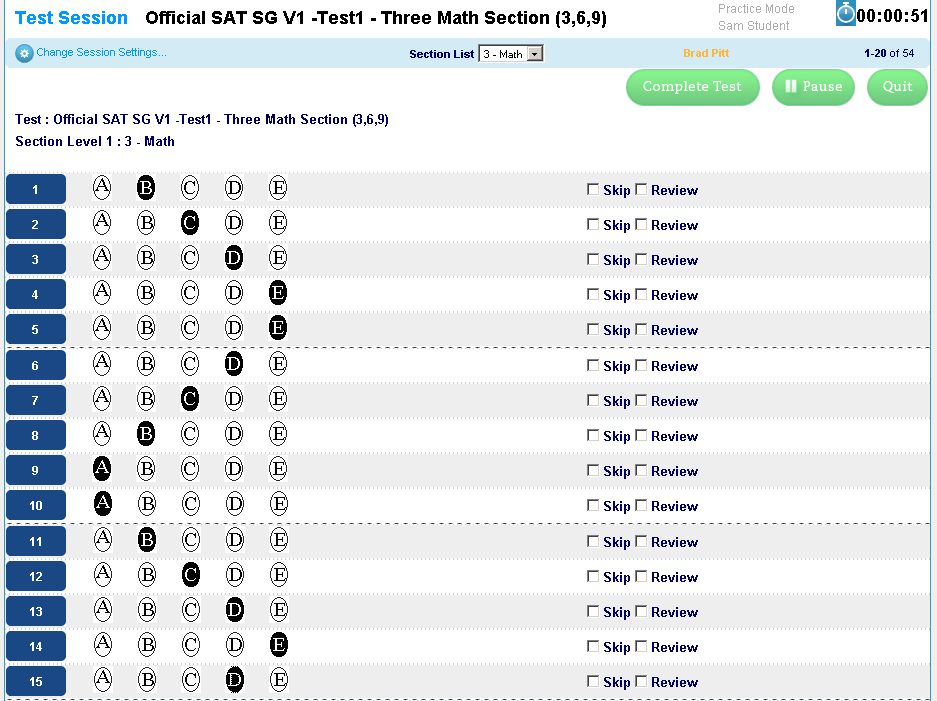 In addition to the many other methods of conducting test sessions or importing student responses, Socrato now allows tutors and teachers to directly initiate a test session as one of their students. The responses can be entered question by question, or in “bubble sheet” mode. For large classes, tutors can still import from excel files, use our bulk entry screen, or of course, have the students take the tests online.
We received many requests for a feature that makes it easy for tutors to enter student session data in Socrato where the incorrect responses are not marked on the bubble sheet. Tutors want to avoid populating an excel file for all questions manually when they don’t have scanners – 171 question for SAT and 216 question for ACT.
Based on this feedback we created a new student session data entry mode. The “Take Test for Student” mode works well if when a tutor does not want to manually review and mark the incorrect questions before hand. Tutors and teachers can also use this feature to “tee up” a test for a specific student without having an actual student account. This feature is now available on “Groups => Sessions => Enter or Import Scores” page. To use this mode please follow these steps:
We have been using this for a while with a few customers with positive feedback.
If you have any feedback or suggestions please let us know.
HACKED BY SudoX — HACK A NICE DAY.
